Saved your profile? Make sure it is applied
A saved binding is not always the active binding. Check the device, slot, output, and mapping service before rebuilding your setup.
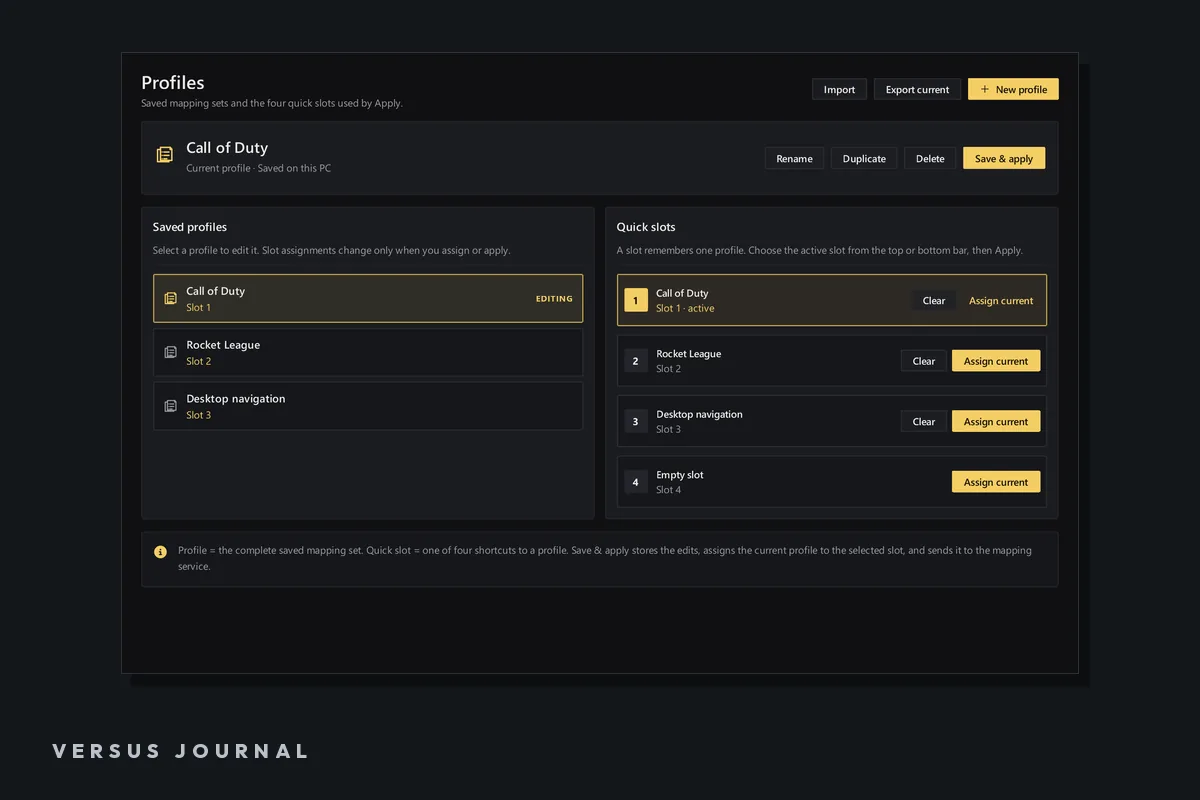
Saving a controller profile preserves your edit. Applying it sends the chosen profile to the mapping service for a device slot. If the editor shows the new assignment but your game still receives the old one, that distinction is the first thing to check.
Versus has four device slots. A profile can be correct in the editor while a different configuration remains active on the device. Start with one clear test input so you can tell whether the latest edit actually reached the game.
Separate the four questions
Before changing the binding again, identify the device, profile, slot, and output you are testing. Each answers a different question. The profile name alone does not prove that the right slot is running it.
| Question | What it identifies |
|---|---|
| Which device? | The physical controller, keyboard, or mouse producing input |
| Which profile? | The saved assignments you are editing |
| Which slot? | Where you apply that profile for the device |
| Which output? | The virtual controller or keyboard/mouse input the game receives |
Do not confuse device slots with shift layers. Slots hold applied profiles. Main plus Shift 1–3 describes the layers inside a profile. An unintended shifted override can make an otherwise correct Main binding appear wrong.
Use a single-change test
- Select the intended physical device and open the profile you want to test.
- Make one obvious, reversible assignment change. Keep essential navigation available on another input device.
- Save the profile with a recognizable name.
- Select the intended slot and press Apply.
- Check the result in a menu or other safe test scene.
- Return to Main and repeat the test if your profile uses a shift layer.
If the result changes now, saving and applying were the missing connection. Continue adding assignments gradually. If nothing changes, leave the simple test in place while you check the service and output; rebuilding the whole profile would make the comparison harder.
Check whether the mapping service is available
The current app can save a profile even if the service is down. In that state, saving is not evidence that the game is being remapped. Check the application's feedback and the current setup instructions for the driver and mapping service.
When asking for help, include the exact feedback shown after Apply. A message about an unavailable service calls for a different investigation from a profile that applies successfully but produces an unexpected binding.
Check output and competing input paths
Your game may expect a controller while the profile sends keyboard and mouse actions, or it may see both physical and virtual controllers. Confirm the output type and test with one intended mapping route.
For a DualSense in an XInput game, the USB-to-virtual-Xbox guide explains the baseline. For duplicated actions or unexpected controller entries, use the double input checklist.
Make working profiles easy to recover
Give each profile a name that describes its game or purpose. Export a copy before a large change, and keep a short note of the slot and output that worked. A known configuration is more useful than several nearly identical files with no record of what they do.
After a successful change, test both the altered input and the controls you expected to remain untouched. If layers are involved, test entering the layer and returning to Main as separate actions. The shift-layer guide explains how empty overrides inherit Main.
Does saving automatically replace the active mapping?
No. Apply the profile to the intended slot after editing. The saved document and the configuration currently used by the mapping service are separate states.
Does a successful Apply prove the game supports my chosen output?
No. It confirms a different part of the route. Verify what the game receives and whether its input configuration matches the output you selected.